How an Online Microphone Tuner Works: TunerNinja Precision Explained
Have you ever played a note on your guitar and watched an online tuner instantly tell you if it's sharp or flat? For many music beginners, the technology behind a microphone tuner can feel like magic. How does a website listen to your instrument and guide you to perfect pitch? It's a question worth asking, because understanding the process helps you trust the tool and tune more effectively.
For new musicians, getting in tune is the first step to sounding great. In this guide, we will pull back the curtain on the secrets of microphone tuners. We'll break down the advanced science into simple, fun terms. You'll learn how your sound travels from your instrument to your screen with incredible precision.
We built TunerNinja to make this powerful technology accessible to everyone. Get ready to discover the science that helps your music shine.
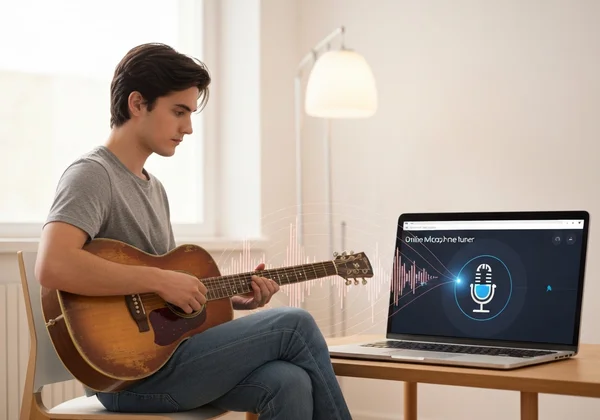
Online Microphone Tuner Explained: Your Browser's Secret Listener
The journey to perfect pitch begins with a simple action: playing a note. But what happens next? An online microphone tuner acts as a bridge between the physical world of sound and the digital world of your computer. It’s a sophisticated listener that lives right in your web browser.
This process involves two critical steps. First, your microphone has to capture the sound accurately. Second, you need to give your browser permission to listen. Let's explore how these elements work together to get your tuning journey started.
From Sound Waves to Digital Data: How Your Mic Captures Pitch
When you pluck a guitar string or play a note on a ukulele, it vibrates. These vibrations travel through the air as sound waves, much like ripples spreading across a pond. Your device's microphone contains a tiny diaphragm that moves back and forth when these sound waves hit it.
This movement is converted into an electrical signal. A tool like TunerNinja then reads this signal and transforms it into digital data—a language the computer can understand. In essence, the microphone "translates" the physical sound of your instrument into a digital format, capturing every detail of its pitch and tone. This initial capture is the foundation for everything that follows.

Granting Access: Why Your Tuner Needs Microphone Permissions
Have you ever visited a tuner and seen a pop-up asking for microphone access? This is a crucial security and privacy feature built into modern web browsers. The browser will never let a website listen in without your explicit permission.
Granting access lets the tuner listen only while the tab's open. We process audio right in your browser—no servers involved. The sound data from your microphone is never uploaded or stored. This permission simply opens the door for our tool to analyze your instrument's sound in real-time and provide the instant feedback you need.
Pitch Detection Tuner: Unveiling the Ninja's Sonic Precision
Once your browser has the digital sound data, the real "ninja magic" begins. This is where a pitch detection tuner uses powerful algorithms to analyze the sound and identify its exact musical note. It’s not just about hearing the sound; it’s about measuring it with incredible accuracy.
This process is a blend of music theory and cutting-edge computer science. To understand how TunerNinja achieves its professional-grade precision, we need to look at the concepts of frequency, cents, and the clever algorithms that make sense of it all. This technology is what separates a basic tuner from a truly reliable musical partner.
The Science of Sound: Understanding Frequencies and Cents
Every musical note has a specific frequency, which is measured in Hertz (Hz). Frequency simply refers to how many times a sound wave vibrates per second. For example, the standard tuning for the open A string on a guitar is 110 Hz. A higher note has a higher frequency, while a lower note has a lower frequency.
To achieve incredible accuracy, musicians use a smaller unit of measurement called a "cent." One cent is equal to 1/100th of a semitone (the distance between two adjacent notes on a piano). The human ear can barely detect a difference of 5-6 cents, but a precise tuner can do much better. A great instrument tuner measures deviations as small as ±0.1 cents. That's pro-level precision.
Fast Fourier Transform (FFT): How TunerNinja Hears Every Note
When you play a note, the sound isn't perfectly "clean." It contains the main note (the fundamental frequency) plus many subtler, higher-pitched overtones. Overtones give your instrument its unique timbre. Tuners ignore them to lock onto the main pitch.
This is where a brilliant mathematical algorithm called the Fast Fourier Transform (FFT) comes in. Think of FFT as a prism for sound. Just as a prism splits white light into its component colors, FFT takes a complex sound signal and separates it into all the individual frequencies it contains. The algorithm then identifies the strongest, most dominant frequency—the note you intended to play. This allows TunerNinja to "hear" with ninja-like focus, cutting through the noise to find the true pitch.
Real-time Feedback: Visualizing Your Pitch with Waveforms and Dials
Identifying the pitch is only half the battle. A great tuner must present this information to you in a way that is clear, immediate, and easy to act on. This is where the user interface comes into play.
After the FFT algorithm determines your note's frequency, the tool compares it to the internationally recognized standard for that note. The difference is then displayed on the screen.
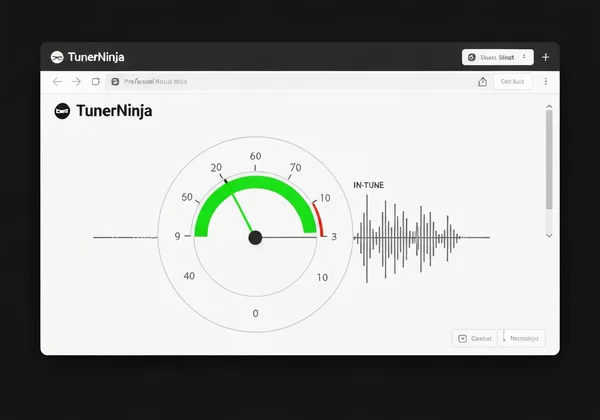
- The Dial/Meter: This gives you a simple visual cue. If the needle is to the left, your note is flat (too low). If it's to the right, your note is sharp (too high). The goal is to get the needle perfectly centered in the green zone.
- The Waveform: This provides a visual representation of the sound wave itself, showing you the stability and consistency of your note.
This instant visual feedback loop allows you to make tiny adjustments to your instrument's tuning pegs until you hit the perfect pitch. You can try our free tuner to see this in action.
Browser Tuner Technology: TunerNinja's Seamless Advantage
The science behind pitch detection is impressive, but how it's delivered matters just as much. Browser tuner technology leverages the power of the modern web to provide a tuning experience that is not only accurate but also incredibly convenient.
Unlike traditional hardware tuners or downloadable mobile apps, a web-based tool like TunerNinja offers unique advantages. It eliminates barriers, ensuring that anyone, anywhere, can get their instrument in tune without hassle. This focus on accessibility and performance is what makes it a top choice for beginners and pros alike.
No Downloads, No Delays: The Power of Web-Based Tuning
One of the biggest benefits of a browser tuner is its immediacy. There is nothing to install and no app to download. You don't have to worry about using up precious storage space on your phone or computer. All you need is a device with a microphone and an internet browser.
Simply navigate to the website, and the tuner is ready to go. This makes it perfect for a quick tune-up before practice, a lesson, or a performance. Whether you are on a laptop, tablet, or smartphone, the experience is seamless and consistent. This "zero-barrier" approach means a high-precision tuner is always just a click away.
Ensuring Accuracy: What Makes TunerNinja a Top Choice?
A common question is, "Is an online tuner accurate?" The answer is a resounding yes. Modern web tech makes browser tuners super reliable. TunerNinja hits ±0.1 cents—better than many pricey hardware ones.
Our commitment to accuracy is built on a foundation of clean code, efficient algorithms, and a deep understanding of audio processing. By focusing purely on the core task of tuning, we deliver a tool that is not only precise but also fast and responsive. The unique ninja theme and gamified elements are just our way of making a highly technical process fun and engaging for everyone.
Troubleshooting Common Mic Tuner Issues: Tips for Perfect Performance
Even the best technology can sometimes run into hiccups. If your tuner isn't working as expected, a few simple checks can usually solve the problem. Here are some ninja tips for a flawless tuning experience:
- Check Microphone Permissions: Make sure you clicked "Allow" when the browser asked for microphone access. If you accidentally blocked it, you can reset the permission in your browser's site settings.
- Reduce Background Noise: A sensitive tuner needs quiet. Try to tune in a calm environment so the microphone can clearly hear your instrument without interference from TVs or conversations.
- Play One String at a Time: Pluck a single string cleanly and let it ring out. If other strings are vibrating, it can confuse the tuner.
- Check Your Volume: Ensure you are playing loud enough for the microphone to pick up the sound, but not so loud that it distorts the signal.
Mastering Your Pitch: Unleash Your Instrument's True Voice with TunerNinja
So, what's happening behind the screen? Your string vibrates, the mic catches it, and TunerNinja's ninja tech pins the pitch.
Picture this: our tool grabs your guitar's vibe, uses FFT wizardry to ninja-chop the background noise, and lights up that perfect green zone. It’s not magic—it's just smart, fast technology designed to help you sound your best. No downloads, no hardware, just precision. Now that you understand how it works, it's time to put that knowledge into practice.
Start tuning now with TunerNinja and hear the difference for yourself!**
Frequently Asked Questions About Microphone Tuners
Is an online microphone tuner as accurate as a physical one?
Yes, absolutely. A well-designed online tuner like TunerNinja uses highly advanced pitch detection algorithms that can achieve a precision of ±0.1 cents. This level of accuracy is on par with, and often superior to, many mid-range physical clip-on or pedal tuners. The core technology is software-based, so its performance depends on the quality of the algorithms, not the physical casing.
How does a free online tuner maintain its precision?
Precision comes from the quality of the software's code and the efficiency of its algorithms. A tuner like TunerNinja maintains its high accuracy by focusing on a core, expertly-developed function: pitch detection. It runs directly in your browser, using modern web technologies that are both powerful and efficient, ensuring you get reliable results without any cost.
What should I do if my online tuner isn't picking up sound?
If the tuner isn't responding, first ensure you have granted microphone permissions in your browser. Next, check that your device's microphone is not muted and the input volume is at a reasonable level. Finally, try to tune in a quiet room and play each string clearly and individually. These simple steps solve the vast majority of issues.
Can I use TunerNinja to tune any instrument?
TunerNinja is a chromatic tuner, which means it is designed to detect all 12 notes in the standard Western musical scale. This makes it incredibly versatile and suitable for a wide range of instruments, including 6-string guitars, bass guitars, ukuleles, violins, cellos, and more. As long as your instrument produces a clear pitch, our online chromatic tuner can help you get it perfectly in tune.